

 About Us
Lifecycle
A partner organization moves through four states:
A rejection email carries the reason, categorized as Incomplete documentation, Not eligible, Duplicate or Other.
Settings
Open Settings from the sidebar. The tabs depend on your role. Users with Manage settings see Profile, Branding, Security and a disabled Notifications tab. Users without Manage settings see only Security. Every signed-in user can change their own password. Editing the organization itself requires a role with Manage settings.Profile
The Profile tab shows the Partner Information card: your organization name, its current status, the date it joined, the Partner Code and an editable Company Name.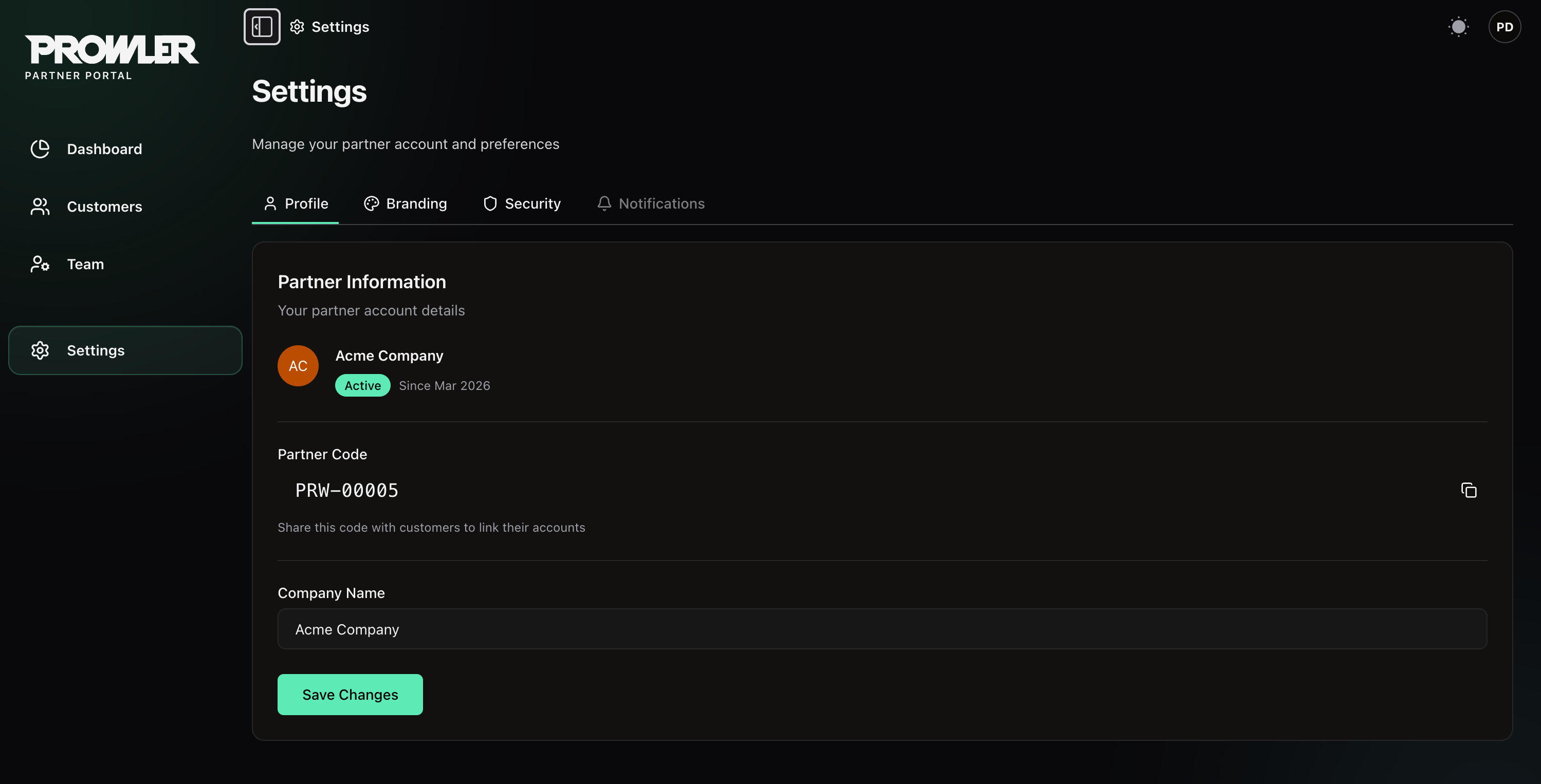
- Partner Code — a read-only, Prowler-issued identifier in the form
PRW-00000. The helper text reads “Share this code with customers to link their accounts.” Copy it with the button at the end of the row. - Company Name — the display name used in the console, in invitations and in outbound email. Edit it and click Save Changes.
Branding
Upload your logo. See Customizing Your Branding.Security
Change your own password. Users with Manage settings can also see the Danger zone described below, but only the partner owner can submit a deletion request. An Organization Admin sees the password form only.Customer Capacity
Each partner organization has a cap on how many customers it can hold at once. The default is 50. To raise it, contact Prowler.Closing Your Organization
Deleting a partner organization is a request, not an immediate action.1
Open the Danger zone
Go to Settings → Security. The Danger zone requires Manage settings, and submitting its Delete Partner request is restricted to the partner owner.
2
File the request
Enter a required Reason for deletion. The UI accepts 10–1000 characters, and the API rejects reasons shorter than 10 characters. Then type
DELETE in the confirmation field to enable the button and submit.3
Wait for review
Filing the request notifies the Prowler team and sends a confirmation to the requester. The Danger zone then reports that a deletion request is already pending review. You and your team keep full access while it is pending.
4
Offboard with Prowler
The Prowler team coordinates the offboarding from there, including what happens to each customer tenant and when your organization is closed. Closing removes the partner organization, its team memberships and its branding assets, and invalidates every session.
Closing a partner organization does not delete customer data in Prowler Cloud on its own. The Prowler team confirms the handling of each customer tenant as part of the offboarding.
Ownership
One user is the owner of the partner organization — by default, whoever signed up. Ownership transfer is Prowler-assisted rather than self-service: contact Prowler to request it. Prowler staff can transfer ownership only when the partner has no customer organizations and the target is an active Superadmin. The previous owner keeps the Superadmin role, and the current owner cannot be removed from the team while they hold ownership.Next Steps
Managing Your Team
Invite team members and assign roles.
Customizing Your Branding
Upload your logo.
Onboarding Customers
Add customers and open their Prowler Cloud tenants.