About Us
prowlercloud/prowler Docker image. It supports every Prowler provider (AWS, Azure, GCP, Kubernetes, GitHub, Cloudflare, IaC, and more), optionally pushes findings to Prowler Cloud, and uploads SARIF results to GitHub Code Scanning so findings appear in the Security tab and as inline PR annotations.
Source: prowler-cloud/prowler · Marketplace listing: Prowler Security Scan.
Inputs
Usage
AWS scan
Push findings to Prowler Cloud
Send scan results directly to Prowler Cloud for centralized visibility, compliance tracking, and team collaboration.When
push-to-cloud: true, PROWLER_CLOUD_API_KEY is forwarded automatically — set it in env: but don’t list it in extra-env. Requires a Prowler Cloud subscription and an API key with the Manage Ingestions permission. See API Keys.Upload SARIF to GitHub Code Scanning
Findings appear in the Security tab and as inline PR annotations when SARIF upload is enabled.Combine push-to-cloud with SARIF upload
Scan the current repository with the GitHub provider
--repository scans a single repo. Use --organization <name> instead to include org-level checks (MFA, security policies, etc.). See the GitHub provider authentication for required token permissions.Fail the PR on findings
By default the action tolerates findings (exit code 3) and succeeds. Setfail-on-findings: true to fail the workflow step when Prowler detects findings. Combine with --severity to control which severity levels trigger the failure:
if: always()) so findings appear in the Security tab regardless.
Authentication
Each provider requires its own credentials passed as environment variables. Credentials are not forwarded automatically — list every env var name you need in theextra-env input, and set its value via env: at the step, job, or workflow level (typically from secrets.*).
Refer to the Prowler provider docs for the full list of variables each provider supports. Common ones:
PROWLER_CLOUD_API_KEY is auto-forwarded when push-to-cloud: true — no need to add it to extra-env.AWS
Use aws-actions/configure-aws-credentials with OIDC (recommended) or pass static credentials. OIDC setsAWS_* env vars on the runner, so you only forward them:
Azure
Use azure/login with a service principal or pass credentials directly:GCP
Use google-github-actions/auth with Workload Identity Federation (recommended):Cloudflare
Create a Cloudflare API Token withZone:Read, Zone Settings:Read, and DNS:Read permissions (provider auth docs). Then:
Outputs
Scan results are written tooutput/ in the workspace and uploaded as artifacts named prowler-<provider> with 30-day retention.
When upload-sarif is enabled, SARIF results are also uploaded to GitHub Code Scanning and appear on the repository’s Security → Code scanning tab, filtered by the branch that ran the scan.
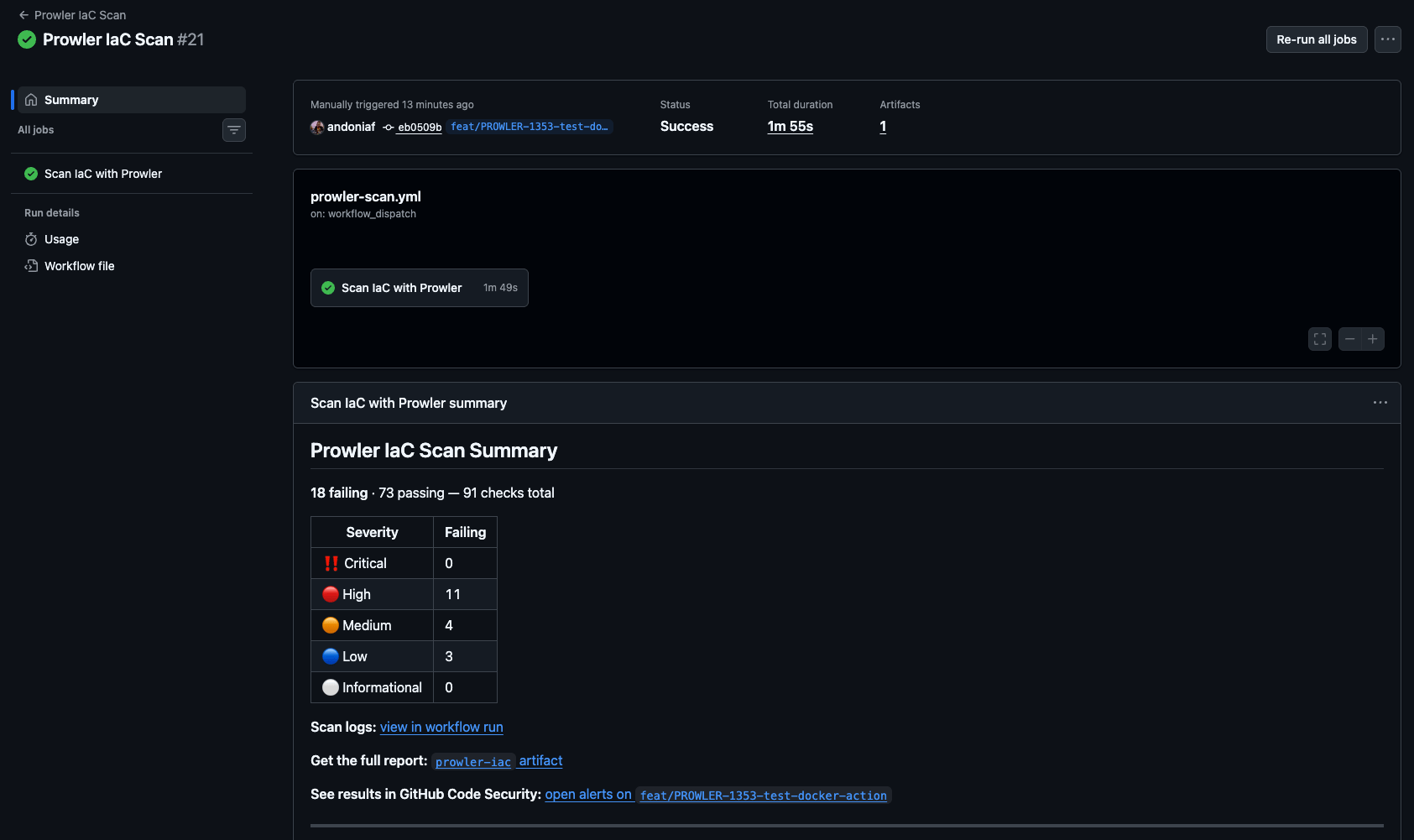
Step summary
The action writes a summary to the run page with a per-severity breakdown of failing checks, artifact and Code Scanning links, and (whenpush-to-cloud: false) a pointer to Prowler Cloud for continuous monitoring.